How to use google analytics


When you have created a website or blog using blogger, wordpress and wix, then you will definitely want to know, how many visitors to your website or blog, what they often see on your website, where your website visitors come from and others.

For that you need a website analysis tool. in this case we will use a website analysis tool called google analytics.

What is Google Analytics? Google Analytics is web-based software that is used to analyze website performance: tracking, seeing age, and knowing the number of visitors. Not only that, there are many more Google Analytics features that you can use.


Analysis from Google Analytics can be used as material to plan and create better content for customers (customers). So Google Analytics can be a door for you to develop a website that is more attractive and responds to market needs.
Let’s begin, how to associate your website with Google Analytics.

1. You must register first in Google Analytics Registration

2. After you are registered, please go to the dashboard and click the admin menu.

How to use google analytics

3. Click create property menu. Fill in all the columns provided as shown below, then click Create.


How to use google analytics


How to use google analytics


4. Congratulations, you've got a tracking ID from Google Analytics.


How to use google analytics


5. In the following example I will enter the Google Analytics tracking ID into my online store              website.My online store uses the teespring website, where I use Google Analytics to learn the            characteristics of visitors to my online store.The following is the tracking ID that I have entered into the online store settings.

How to use google analytics


6. Just waiting for the results of the google analytics report.Good luck

How to use google analytics


Build your own website using Wix


In the previous article we discussed creating a website using wordpress and blogger. This time we will try to make a website using Wix.

The first step is to open the Wix website, then click get started.

Build your own website using Wix


Please register, you can fill out the registration form, using a facebook account or google account.


Build your own website using Wix


Next you will be taken to the page let's get started. Click let's do it. Next you will be asked to choose how you build your website. in this article, I choose Let Wix ADI Create A Website For You then click start now.


Build your own website using Wix


Build your own website using Wix


Next you will be asked what kind of website you want to create. Please choose the one that suits you.


Build your own website using Wix


Then please fill in the website type or choose one below.

Build your own website using Wix


Select the features offered for your website.

Build your own website using Wix


Fill in the fields for what is the name of your organization

Build your own website using Wix


Then you will be asked Do you want to import your images and text, if there isn't, click skip.

Build your own website using Wix


Then on the Review and edit your info page, please fill in the information according to the form provided.

Build your own website using Wix


Then select the theme that has been provided as you wish.

Build your own website using Wix


Then on the pick your favorite homepage design page, wait for the current process.


Build your own website using Wix


Build your own website using Wix


Then you will be taken to your website dashboard.


Build your own website using Wix


To change themes and menus, use the edit and design menus.


Build your own website using Wix


To publish your website, click the Publish button. Enjoy improvising your new website.


Build your own website using Wix


Build your own website using Wix

Build your own website or blog using Blogger

This is a continuation of the Build your own websites or blog using wordpress tutorial.

this time we build a website or blog using blogger.Open the  blogger website address, click create your blog.

Build your own website or blog using Blogger

You will be faced with a google account login page, because blogger uses a Google account for registration.
Build your own website or blog using Blogger


Next, please fill in a name for your profile on blogger, then click continue to blogger.


Build your own website or blog using Blogger


Next you will be asked to create your blogger name, click create new blog.

Build your own website or blog using Blogger

Then, please fill in the title of your blog, the blog address, which will be added automatically domain .blogspot.com. at the bottom, please select the theme that you like. Next click create blog !.

Build your own website or blog using Blogger


You will go to blogger dashboard page. Congratulations, your blog is ready. please make a posting.

Build your own website or blog using Blogger


To see the front view of the blog, please click View Blog at the top right of your dashboard.

Build your own website or blog using Blogger


Build your own website or blog using Blogger

Build your own website or blog using Wordpress.


This is a little guide how to build your own website or blog.First of all, please go to the wordpress website ,then click start your website.

Build your own website or blog using Wordpress


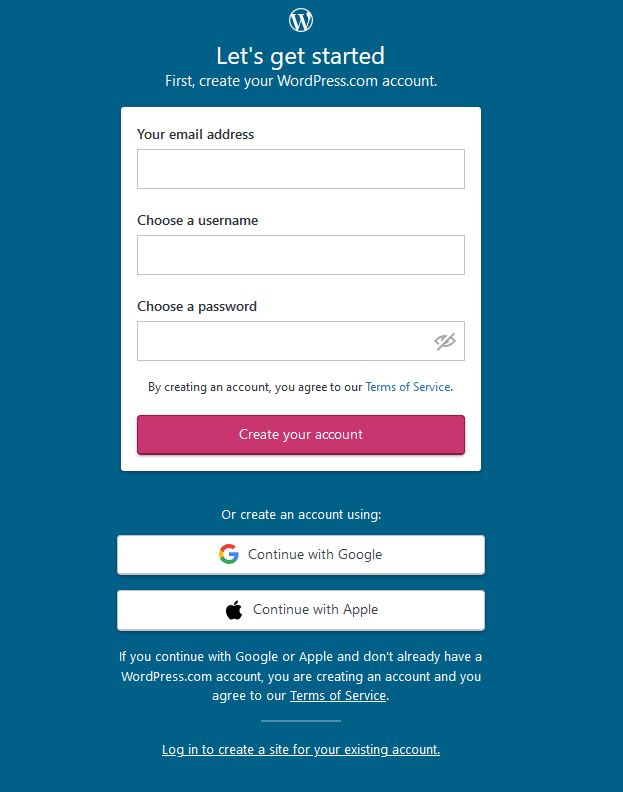
Please fill in the form for free wordpress account registration. Then click create your account.
Or you can continue with google account or Apple account.

Build your own website or blog using Wordpress

there will be questions what kind of site are you building? in this case, I chose professional, then clicked.


Build your own website or blog using Wordpress


then the question will appear "What type of work do you do?" There will be several options underneath, but you can fill in as you wish. in this case, I fill in the tutor for my choice. Then click continue.

Build your own website or blog using Wordpress

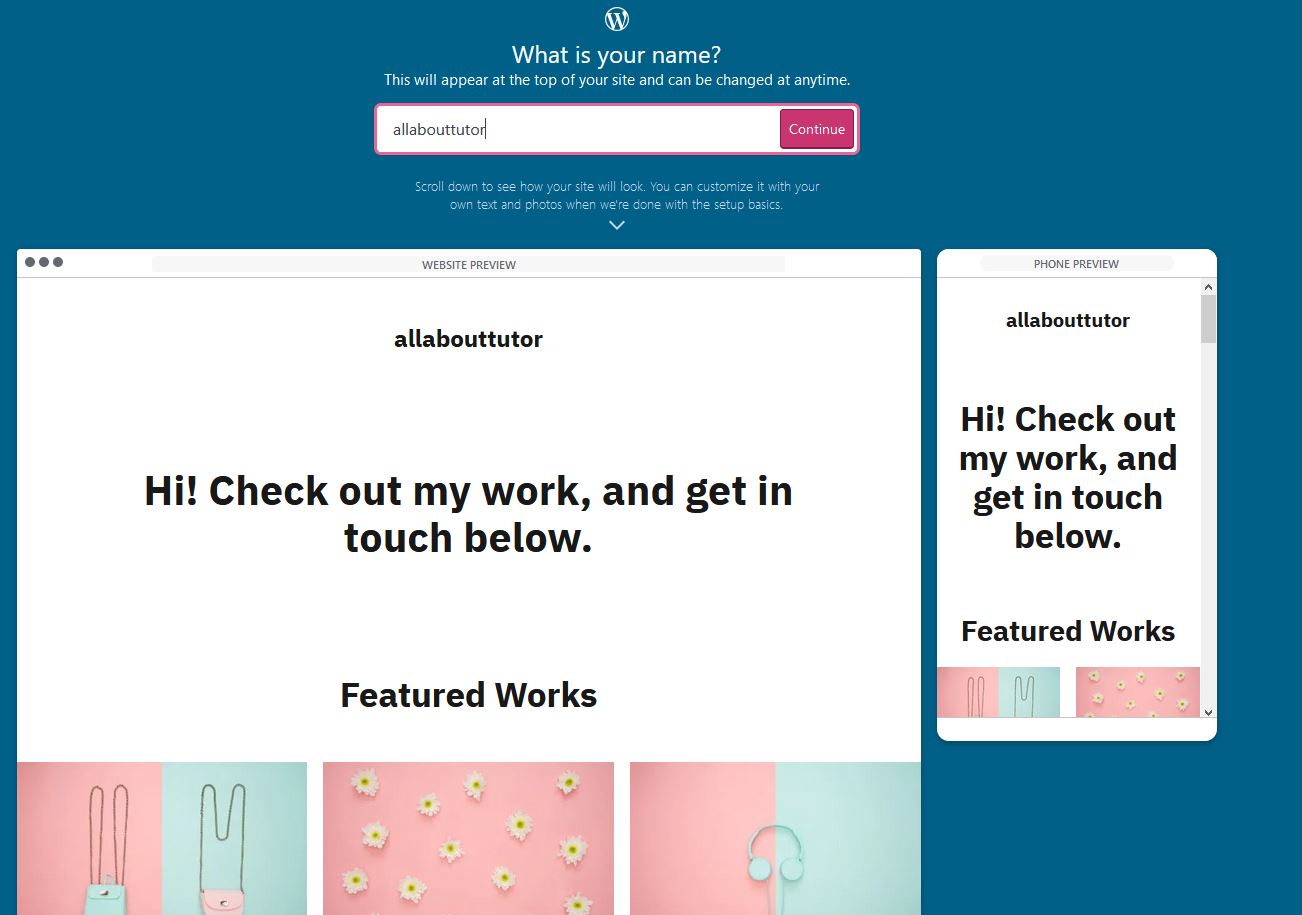
then you will be asked what is your name.in this case I fill allabouttutor, you can see the results at the bottom.


Build your own website or blog using Wordpress

then you will be taken to a page to determine the website domain. please select the free one, and click select.

Build your own website or blog using Wordpress


Next you will be taken to a page to determine the type of website service. because we will use a free service, please select start with a free site.

Build your own website or blog using Wordpress

congratulations you have managed to get a free website, please be creative with the menu that has been provided by wordpress

Build your own website or blog using Wordpress